

Appearance
Sales Goals
Set monthly revenue targets for your boutique — store-wide, per location, or per individual staff member — and track progress from the Dashboard. Sales Goals help you stay on pace throughout the month with a visual progress ring that shows how close you are to hitting your target.
Go to Settings > Sales Goals to configure them.
Setting Goals
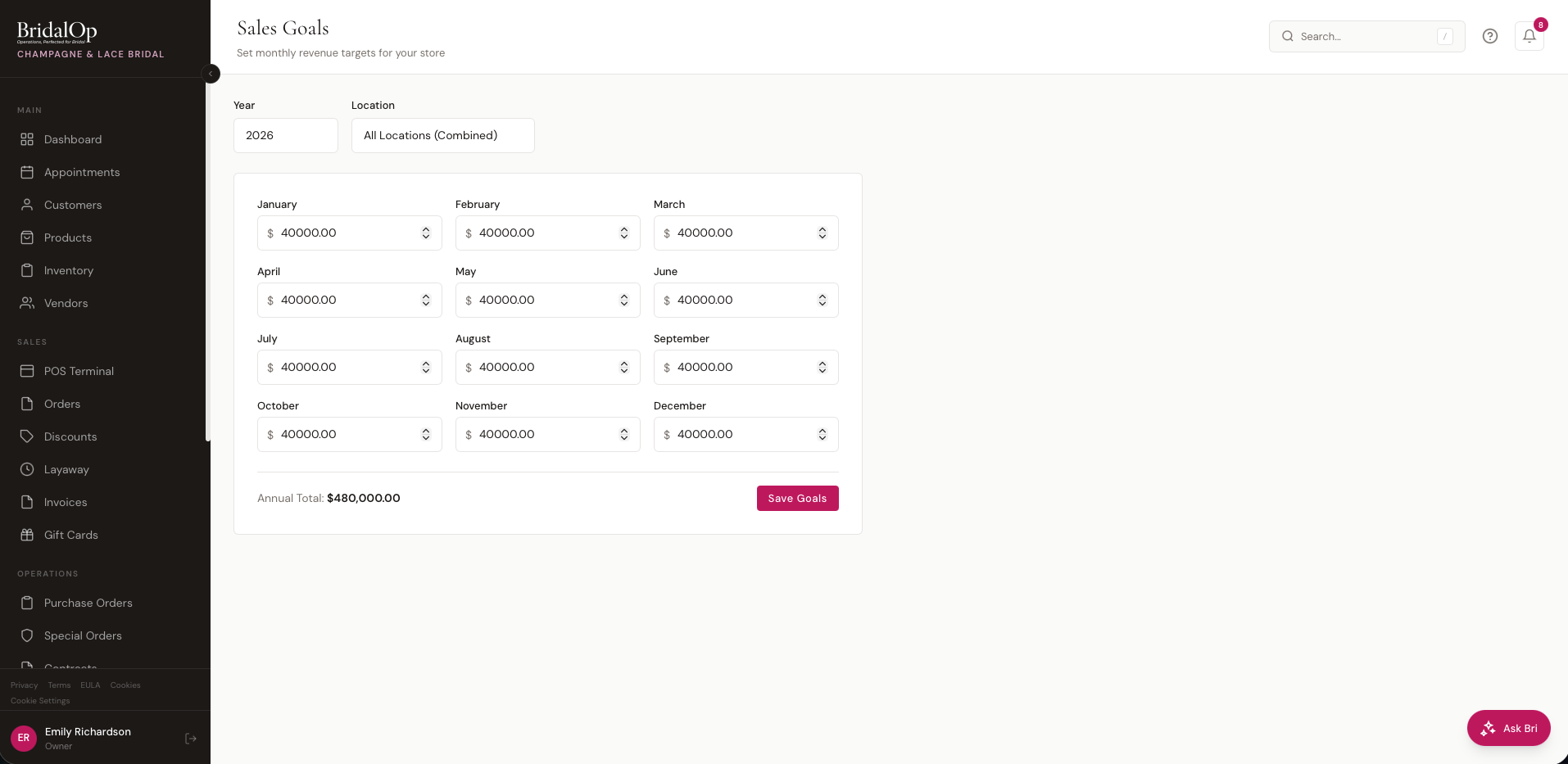
Select a Year and a Scope at the top of the page, then enter a dollar amount for each month. The Annual Total at the bottom updates in real-time as you adjust your monthly targets.
| Field | Description |
|---|---|
| Year | The calendar year for these goals |
| Scope | What the goal measures — Store Total, a specific Location, or an individual Staff member. The selector is a searchable combobox (same pattern as the POS customer picker). |
| January – December | Monthly revenue target in dollars |
Click Save Goals when you're done. You can leave months at $0 if you don't want to set a target for that month.
Goal Scopes
- Store Total — one goal that measures combined revenue across every location
- Specific location — measures revenue for a single location; staff assigned there see this goal in their Dashboard ring (Owner + Manager only)
- Department — measures revenue for one department, like Gowns, Alterations or Menswear. A department is a product type, the same grouping as the Gross Margin by Department report. Set goals only for the departments you want to track; they appear in the Department Goals card on the Sales Dashboard
- Individual staff member — measures revenue attributed to that staff member via
sold_byon each order line (with order-level fallback). Mirrors how Commissions track sales, so the staff ring lines up with the staff member's commission earnings.
A single goal is for the store, a location, a department or a staff member, never more than one. Pick the scope, save, and add a separate goal if you want a different cut.
Your store goals also show on the Sales Dashboard, against this month's, this quarter's and this year's revenue.
Dashboard Widget
When a goal is set for the current month, a progress widget appears on the Dashboard:
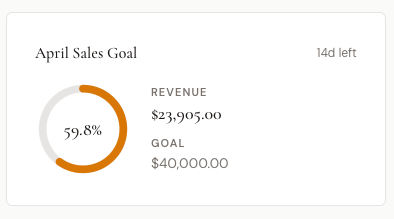
The widget shows:
- Month name and days left in the month
- Progress ring with percentage complete
- Revenue — total revenue from completed orders this month
- Goal — your target for the month
Progress Ring Colors
| Color | Meaning |
|---|---|
| Green | 100% or more — goal reached |
| Rose | 60%–99% — on track |
| Amber | Under 60% — behind pace |
What Counts as Revenue
Revenue is calculated from completed orders within the current calendar month, using the order subtotal (before tax, after discounts). Only orders with a "completed" status and a completion date within the month are counted.
Who Sees Which Ring
- Owner + Manager — see the existing store / location ring (unchanged from before)
- Everyone else — the store ring is hidden. Instead they see a Your [Month] Goal personal ring backed by the staff goal you set for them. Revenue is attributed via the
sold_byfield on each order line (with order-level fallback), so the number matches what they'd see in commissions. - If a non-owner / non-manager has no personal goal set for the current month, the widget hides entirely — no empty placeholder.